In early rollout — not yet on the stores

The stamp card your customers can’t lose, and you can actually count.

Stampifi is a digital stamp card for your shop. Pick a design, decide how many stamps earn the reward, and hand them out from the phone already in your pocket. Nothing to print, no card reader, nothing for your staff to install.

Free for your customers. You pay for the visits you stamp — see it from their side.
9:41
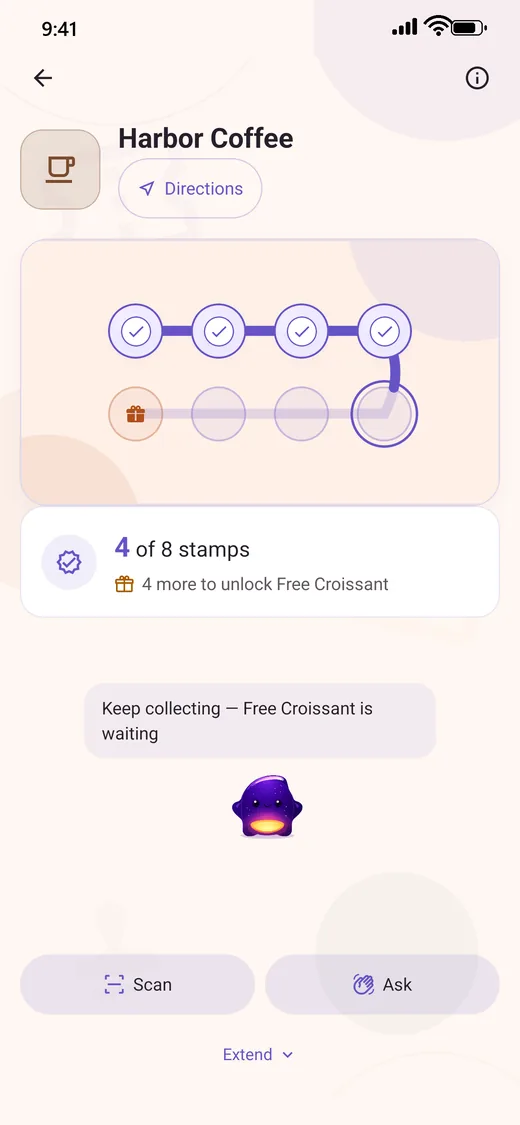
Harbor Coffee Directions
4 of 8 stamps 4 more to unlock Free Croissant
Keep collecting — Free Croissant is waiting
Scan Ask
Home Cards Rewards Places

For your shop

Three things a paper card can’t do.

All of it is in the merchant app already. The rest of this page is how it works.

  1. It doesn’t get thrown out with the receipt

    A paper card lives in a wallet until it is lost, washed or binned — and the visits on it go with it. This one sits in the phone your customer already opens, with their progress on it and the reward counting down.

  2. Change the offer without a print run

    The design, the reward and how many stamps it takes are settings, not a box of cards you already paid for. Anywhere from one stamp to ninety-nine, ten by default, and three designs to start from.

  3. You can see who is actually coming back

    Today’s stamps, who is one visit from a reward, which branch is busy, who has stopped coming — in the same app, with no separate dashboard and no extra seat to buy.

Built for the places that already hand out punch cards — cafés, bakeries, ice-cream counters, salons and barbers, bookshops, bars and small restaurants.

  1. They scan the code on your counter

    One scan and your card is in their phone. No sign-up sheet, no plastic, nothing to hand over.

  2. They collect on the way out

    They scan your counter code, tap the sticker, or ask from the app — whichever suits your counter. It reaches you as a request, and the stamp lands when you say yes.

  3. The reward lands in their wallet

    They see how close they are every time they open the app — and they come back to finish the card.

How a stamp is granted

A stamp only exists after someone approves it.

Every collection method ends the same way: as a request in your queue. Nothing adds a stamp on its own, so a customer cannot mint loyalty by pointing a camera at a photo of your QR code.

NL Noa L.Asked for a stamp · at the counter · 12:42 Waiting
YB Yonatan B.Scanned the store QR · 12:39 Approved
RK Rami K.Tapped at the counter · 12:31 Approved
AD Adi D.Too far from the store · 12:28 Rejected

The customer has to actually be there

Asking for a stamp checks the phone’s location against the branch. When GPS accuracy isn’t good enough to be sure, the app says so rather than guessing — it will not even show a distance it can’t stand behind.

Approve, reject, void, reverse

Mistakes are fixable. A granted stamp can be voided or reversed, and every action lands in a stamp audit trail you can read back later.

Limits that close the obvious holes

Requests expire after 15 minutes, a customer can only have one open request at a time, and a single transaction is capped at 5 stamps.

Collection methods

Six ways to collect. You choose which ones your shop uses.

The store QR is always on — it is the one method every phone can use. Ask is on by default, and you switch the NFC methods on per card, depending on whether your counter has a tag, a tablet, or just a printed code.

Ask for a stamp
The customer asks from inside the app while they’re at the shop. Location is checked, then it lands in your queue.
Any phone
Scan store QR
The customer scans the printed code on your counter.
Any phone
Show QR to staff
The customer’s phone shows a signed code that expires; your staff scans it.
Any phone
Tap store NFC
The customer taps the NFC tag on your counter.
Android & iPhone
Tap at the counter
The customer’s phone acts as the card and taps your reader.
Android only
Staff tablet reads the phone
Your tablet reads the customer’s phone at the till.
Android only

About iPhone and NFC. An iPhone can tap a physical NFC tag, but Apple does not let an app turn the phone itself into a card — so “Tap at the counter” is Android only. iPhone customers fall back to a QR code automatically, every time. QR works on every phone, which is why it is never switched off.

The card itself

Three card designs, and one of them is yours to shape.

Pick a design, pick how many stamps it takes, and decide where the rewards sit. On Classic you can go further and style every single stamp on the card.

Classic

Stamps connected along one path to the reward, so progress reads as a journey rather than a score. It is what a new card starts on, and the only one of the three you can style stamp by stamp.

Your own stamp icons 2 shapes per stamp 17 colours per stamp

Cup

The cup fills a little with every stamp. A fixed design — you choose it and it works — and it stays readable on longer cards, up to about 30 stamps.

Reads well up to ~30 stamps Fixed design

Bloom

Each stamp opens another petal. Also a fixed design, and the one to pick for a short card — it is at its best up to about 14 stamps, where every single visit is visible.

Best up to ~14 stamps Fixed design

No two cards have to look alike

Three designs, five layouts, four ways to mark an earned stamp, and any stamp count from 1 to 99. On Classic, each individual stamp also gets its own shape, its own colour from a palette of 17, and an icon you upload — so a ten-stamp card runs to more arrangements than you could ever use.

Rewards, not just a finish line

A reward can sit on any stamp, not only the last one. Set a fixed prize, drop a message partway through, or run a Mystery Draw that picks from a weighted pool with a cap on how often each prize can come out. Add loyalty levels — Bronze, Silver, Gold, Platinum — and a regular gets a different card from a first-timer.

Redeeming is approved too

The customer taps Redeem, the app shows a code, and your staff approves it. Until then it sits as pending and the customer can cancel. Claimed, unclaimed and expired rewards stay separated in their wallet.

You start from your own card, not a template

There is no gallery of someone else’s designs to pick from. You name the card, choose the places it belongs to, set the stamps and the rewards, and Stampifi generates the QR poster and NFC tag URL for your counter.

For businesses

It’s a back office, not just a card.

Everything below is in the merchant app — there is no separate dashboard to log into, and no extra seat to buy.

Branches, and staff who only see their own

Invite staff by phone number and scope them to specific branches. Each one gets only the permissions you grant: approve stamps, view analytics, show the counter code. A member of staff who also uses Stampifi as a customer switches between Work and Personal without a second account.

Who’s coming back, and who stopped

Analytics with drill-down, customer insights, and segments you can act on — then campaigns aimed at a segment or at people near the shop. Customers can mute a merchant, so this stays a channel rather than a nuisance.

An onboarding kit you can print

Stampifi generates the QR poster for your counter and the URL to write onto an NFC tag. Print it, stick it down, and the card is live.

In the merchant app

TodayStamps, visits and rewards so farLive
RequestsApprove or reject, with a badge countLive
Customer QR stationLeave a tablet out for customers to scanLive
Branches & workersScoped invites and permissionsLive
Segments & campaignsReach a group, or people nearbyLive
Stamp audit trailEvery grant, void and reversalLive

What it costs

Free to build. Paid to go live.

Setting up costs nothing. Add your place, design the card, choose the rewards, invite your staff — all of it before you pay anyone. A plan is what turns the card on for customers, and plans are measured in visits, not stamps: one trip counts once, however many stamps it earned.

Starter

500visits included each month

  • Analytics
  • Choose how many stamps a card takes
  • Unlimited staff

Growth

1,500visits included each month

  • Everything in Starter
  • Your own stamp icons and colours
  • Customer segments
  • More than one reward on a card
  • Referral bonus stamp

Pro

5,000visits included each month

  • Everything in Growth
  • Push campaigns
  • Mystery Draw rewards
  • Loyalty levels

Scale

12,000visits included each month

  • Every Pro feature
  • For a chain, or a very busy counter

Enterprise

Customagreed with us, no ceiling

What “live” actually means

Until a plan is active, your card is a draft: the counter QR will not mint, customers cannot see or join it, and no stamp can be approved. Everything you built stays exactly as you left it, and goes live the moment the plan does.

Going over does not cost you money

There is no per-visit overage charge. Pass your allowance and Stampifi tells you — at 80%, at 100%, and again if you keep climbing — so you can move up a plan when it makes sense. Your cards keep working either way; nothing is switched off automatically and nothing is charged automatically.

No caps on the things that grow

Plans do not limit how many branches, cards, staff or customers you have. Visits are the only thing measured.

  • Free More stamps in that same visit
  • Free A second visit inside 15 minutes
  • Free A request you reject
  • Free Browsing, push, the map, opening the app
  • Free Walking past the shop
  • Free Designing and editing your card
  • Free Every customer account, forever

Subscriptions are bought through the App Store or Google Play, so the price you see is in your own currency, with your own tax, at checkout. Customers are never charged anything.

Languages

Built right-to-left, not translated into it.

Hebrew isn’t a language pack bolted on at the end. The whole layout mirrors, the card reads from the right, and the Hebrew wording has the same coverage as the English. Japanese ships too.

English עברית 日本語
9:41
הכרטיסים שלי דל
הכל (3) קרוב (1) מוכן (1)
קפה הבוקר 7 / 10
עוד 3 חותמות 240 מטר
מאפיית הרחוב 2 / 8
עוד 6 חותמות רחוק מדי
בית כרטיסים פרסים מקומות

Money, data, and who holds what

The boring parts, stated plainly.

We never see card details

Merchant payments are processed by Paddle. Stampifi does not collect or store full card numbers, CVC, or raw card details, and customers never pay anything at all.

Analytics here is opt-in

This website asks before it measures anything. If you agree, it is one first-party cookie for up to two hours, to count visits and active time. It is never used for advertising, and you can withdraw from the footer.

Progress belongs to the account

Stamps and rewards are held against the customer’s account and confirmed by the backend, not stored on the device. That is what makes a new phone a non-event and a forged stamp hard.

Staff get only what you grant

A worker is invited to named branches with named permissions — approve stamps, view analytics, show the counter code — and every worker action is authorised on the server, not just hidden in the app.

Leaving is a button, not an email

Customers can delete their account from inside the app. The privacy policy and terms are published in English and Hebrew.

Accessibility is tracked, not claimed

The app respects reduced-motion settings and the system text size, and mirrors fully for Hebrew. Our accessibility statement says where we are.

Who is behind this

One engineer, one annoying problem.

Daniel Levy Founder and software engineer Stampifi on LinkedIn →

Stampifi started on 19 May 2025, out of a wallet with about ten coffee cards in it — none of them stamped enough to be worth anything, half of them bent, and at least one belonging to a place I had stopped going to. I would turn up at my regular spot, fail to find the right card, and start a new one.

So I started building the thing I wanted: the same idea, minus the paper. I wrote the first version myself, before writing software with AI was something people did, and I have kept going on it through evenings and holidays since — the backend, the app, the fraud gating, all of it.

The point was never to build another app. It was that a small café should be able to run a loyalty card that actually works, and that the person collecting should never lose their progress because a piece of card went through the wash.

Questions people actually ask

Is Stampifi free?

For customers, yes — always, with no limit on cards or rewards. For a business, setting up is free and going live is not: you can add your place, design the card and invite staff without paying, but a plan is required before customers can join it or collect a stamp. Plans are measured in monthly customer visits — 500, 1,500, 5,000 or 12,000 — and are bought through the App Store or Google Play, so you see the price in your own currency at checkout.

Do customers need the app to collect stamps?

Yes. The card, its progress and the rewards live in the customer’s Stampifi account, which is what makes a lost phone survivable and a forged stamp hard. Joining is a single scan of the business’s QR code.

How does a business set this up?

Create a merchant account, add your place, design the card — number of stamps, where the rewards sit, which style — and choose which collection methods you want. Stampifi generates a QR poster and an NFC tag URL you can print. Invite staff by phone number if you want them approving stamps at the counter.

Can a customer get a stamp by tapping their phone?

On Android, yes — the phone acts as the card and taps your reader. Apple does not allow that on iPhone, so iPhone customers get a QR code instead, automatically. Both phones can tap a physical NFC tag on your counter. Either way, the stamp still waits for your approval.

How do rewards work?

You decide what the reward is and which stamp unlocks it — it does not have to be the last one. A card carries one prize by default, and more than one on Growth and above. When a customer earns it, it lands in their reward wallet; they tap Redeem, show the code, and a member of staff approves it, so a reward cannot be claimed twice or claimed from the sofa.

What exactly counts as a visit?

A visit is one trip to your shop where a stamp was approved. The number of stamps does not matter — four coffees on one order is one visit. Anything else at the same place within fifteen minutes is still that same visit. Browsing the app, receiving a push, appearing on the map, or simply walking past does not count, and neither does a request you reject.

Can my staff approve stamps without my account?

Yes. Invite them by phone number and scope them to particular branches, then grant only what they need — approving stamps, viewing analytics, showing the counter code. Staff are unlimited on every plan. Someone who also uses Stampifi as a customer switches between Work and Personal without a second account, and every action they take is authorised on the server, not just hidden in the app.

What happens if a customer loses their phone?

Nothing is lost. Cards, stamps and rewards belong to the account, not the device. They sign in on the new phone and everything the backend has confirmed is there.

Is the app available now?

Not yet. Stampifi is in early rollout ahead of release on the App Store and Google Play. There is no web version — the collection methods depend on the camera and the phone’s NFC hardware.


Stampifi is launching soon.

It will be on both stores at release, and business setup happens inside the app — there is nothing to install on a computer and nothing to sign before then.

Coming soon on App StoreApp Store Coming soon on Google PlayGoogle Play

The app as it stands today

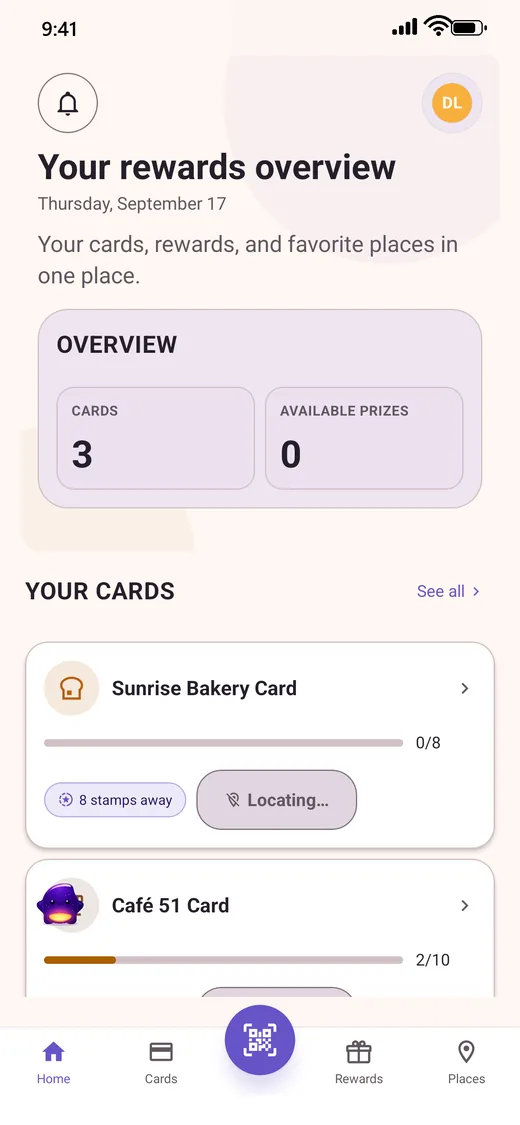
Your rewards overview
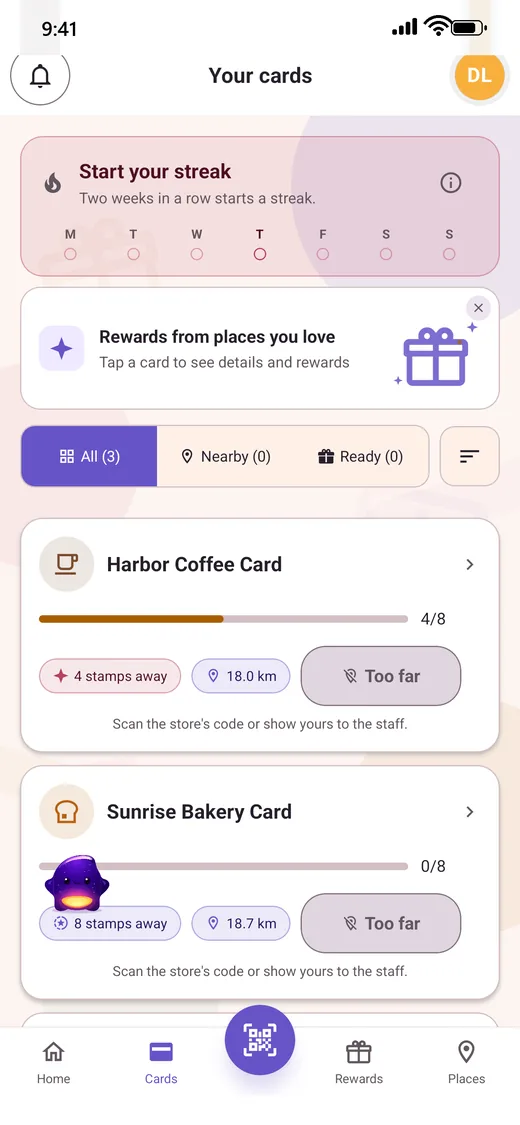
Every card, and how close you are
A card filling up
A card filling up
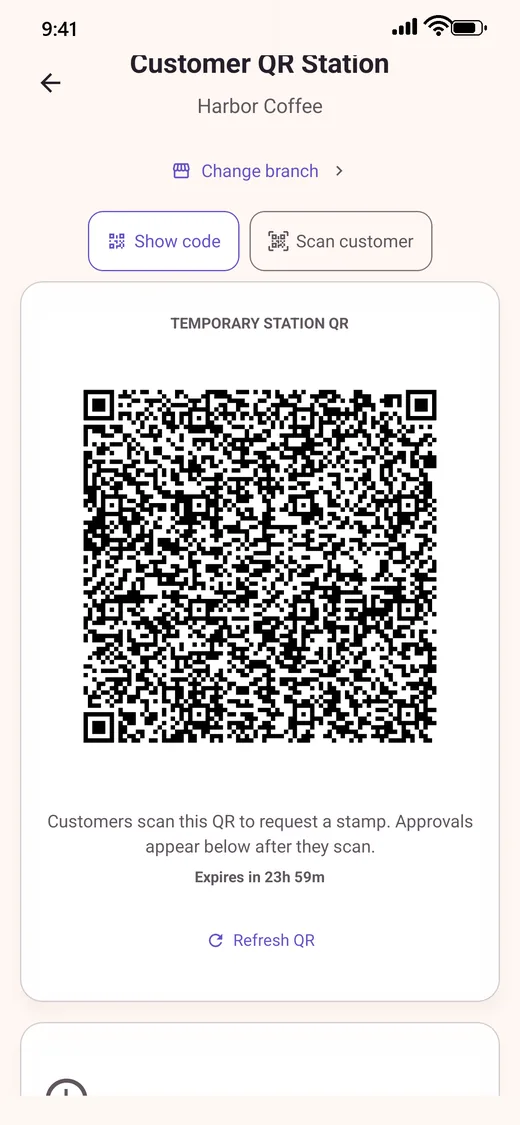
The counter QR station

Questions before then? Talk to support.

See how it works Pricing